Unlocking the Hidden Power of Claude Code with Subagents
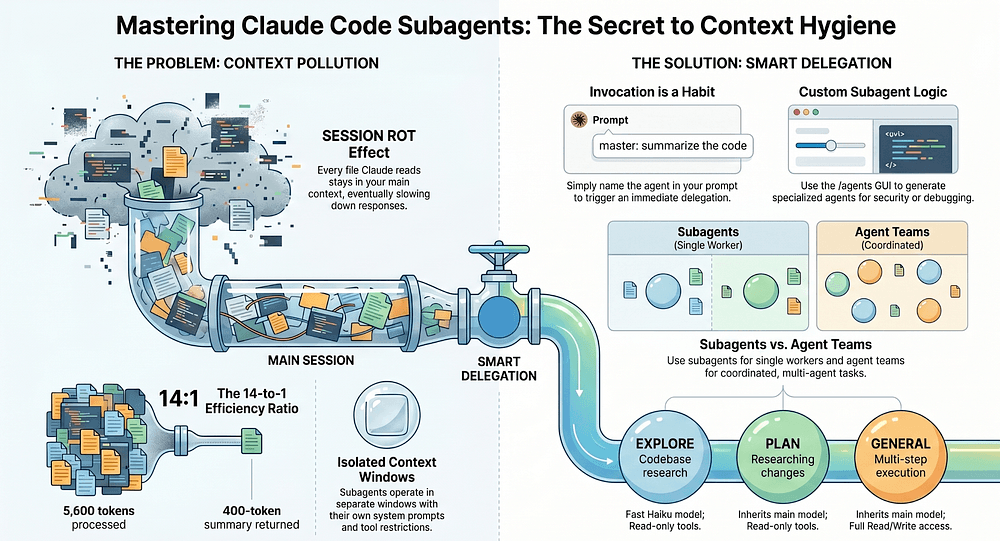
Many engineers overlook Claude Code's subagents, missing out on a game-changing feature. These subagents can keep long sessions from deteriorating, maintaining clarity and precision.
Every engineer knows the frustration: you're deep into a Claude Code session, and suddenly, things start to feel off. The answers get fuzzy, and you blame the model. But what if it's not the model at all? What if the real culprit is your ignorance of subagents?
What Are Subagents?
Claude Code subagents isolate context windows with their own system prompts and tool restrictions. This keeps your main conversation clean, with the parent only getting the final summary, not all the messy intermediate steps. If you've ever felt your session decaying into chaos, subagents are the lifeline you've been missing.
Why This Matters
Let's get real. Skipping subagents is why long sessions fall apart. Most engineers never touch them, and that's a costly oversight. The token exploration stays in the subagent, preventing context pollution. It's like having a clean workspace versus a cluttered one. Which do you think leads to better work?
If you haven't tried subagents, you're missing out on the secret sauce separating amateurs from the pros. It's time to bridge over and see the speed difference firsthand. Solana doesn't wait for permission, and neither should you maximizing your Claude Code sessions.
How to Use Subagents
Get started by invoking subagents through prompt naming or delegation. Use built-in ones like Explore, Plan, and general-purpose out of the box. Want to go further? Create custom subagents with YAML or the /agents UI. The power is in your hands to keep conversations intact and judgment sharp.
Convinced yet? Subagents aren’t just a feature, they're a habit. A compounding habit that ensures your engineering sessions remain as pristine as when you started. Why wouldn't you want that?
Get AI news in your inbox
Daily digest of what matters in AI.