The Real Bottleneck in AI: Why System Design Beats Model Efficiency
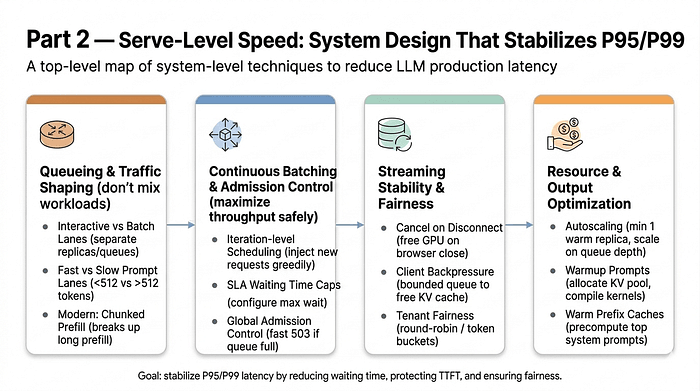
You've optimized your model, but users still complain about speed. The problem? It's not your GPU, it's your system design. to queueing, traffic shaping, and why measuring the right metrics matters.
You've done it all. Quantized the model, switched to Flash Attention, and maybe even dropped to INT4. Your GPU is running like a dream. So why are users still complaining that your app is "sometimes slow"? Here's the real story: once you've optimized your model, the true gains come from how you manage the system around it. Queueing disciplines, traffic routing, and stability controls are where the magic, or the mess, happens.
It's the Queue, Not the Compute
Here's the surprising truth: most production latency isn't about compute time, it's about waiting time. A request might only take 50ms of GPU work but end up spending 800ms in a queue. Why? Because something as silly as a batcher waiting for one more request or a 4K-token prompt hogging the GPU can throw everything off balance. P95 and P99 latency issues? Mostly just waiting in line.
Think about it. Users don't care about your metrics if they're stuck waiting three seconds for a token. Measure the right things, like Time-to-First-Token (TTFT) and Time Per Output Token (TPOT). Split your metrics by lane and optimize each independently. If you mix short chat queries with massive document summaries, you're optimizing the wrong stuff. That's a rookie mistake.
Separate Your Lanes
Don't let different workloads battle over the same GPU. Interactive traffic needs low TTFT, while batch traffic wants high throughput. They want different things from the scheduler. Interactive and batch workloads should be on separate queues with different scheduling policies. It's simple but incredibly effective.
Even within interactive traffic, separate your lanes by prompt length. A 100-token prompt shouldn't share a queue with a 3K-token prompt. The long prompt will stall the short one, and your users will notice. Use router logic to make this easier. Separate lanes for short and long prompts can dramatically reduce wait times.
Modern Alternatives and Continuous Batching
Modern inference engines like vLLM have introduced chunked prefill. Instead of processing a massive 3,000-token prefill in one go, they break it down into smaller chunks. It might not sound groundbreaking, but it can save your user experience from a world of hurt.
Static batching is dead. Continuous batching is the new wave, but don't let greedy schedulers ruin your TTFT. Set maximum wait times aligned with your TTFT SLA. If your SLA is 100ms, make sure no request sits in the queue for more than 80ms. Let’s face it, if you can't control your batches, you're just playing with numbers.
In the end, it's not about having the most advanced model. It's about designing a system that doesn't trip over itself. Because the gap between the keynote and the cubicle is enormous. Management bought the licenses. Nobody told the team. So ask yourself, are you optimizing the right things?
Get AI news in your inbox
Daily digest of what matters in AI.
Key Terms Explained
A mechanism that lets neural networks focus on the most relevant parts of their input when producing output.
The processing power needed to train and run AI models.
An optimized attention algorithm that's mathematically equivalent to standard attention but runs much faster and uses less GPU memory.
Graphics Processing Unit.